The pre‑installed Wi‑Fi equipment is already in your home and gets you online in minutes.
Simply shop our plans, choose your speed, and sign up.
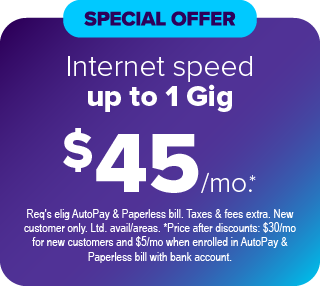
All plans include unlimited data on a 99.9% reliable* network and no annual contract.
*Based on network availability.

- Up to 200 Mbps download and upload speeds
- Created for everyday internet activities, emailing, online shopping, and sharing content.
Limited availability. Service in select locations only.
Offer Details
- Up to 500 Mbps download and upload speeds
- Made for streaming multiple shows, making video calls, working from home, and more.
Limited availability. Service in select locations only.
Offer Details
- Up to 1 Gig download and upload speeds
- Designed for HD streaming, marathon gaming, and a houseful of connected devices.
Limited availability. Service, speed, and rate in select locations only.
Offer DetailsPlus, faster speeds up to 8 Gig are available at some communities.
Why Quantum Fiber?
Ultra-fast unlimited data

- Get fast upload and download symmetrical speeds and unlimited data.
- Up to 1 Gig or even up to 8 Gig.
Limited availability. Service and speed in select locations only.
Reliable day and night

- Gigspeed internet options are available to keep you connected all day and all night on a network with 99.9% reliability*.
*Based on network uptime or availability.
Easy to manage

- Easy—With no annual contract and no credit check, you can just prepay month to month. (Some communities have speed plans included.)
- Upgrade—Just sign up and choose to upgrade to a faster speed anytime. It’s up to you.
How to set up Quantum Fiber in your home.

Step 1: View prices and speeds
- Click on Shop Plans above and enter your home address to view pricing and speeds available in your home.
Step 2: How to connect
- Set up your account: Once you’ve signed up for your service, follow the instructions as explained in your Welcome Email from Quantum Fiber.
- Connect your devices: After you’ve moved in, follow the instructions to connect your devices as explained in your Welcome Email. Or review the directions printed on the Wi-Fi equipment in your home.
Note: Some instructions may have centurylink.com/on; this equipment will work with Quantum Fiber.
Watch our video or review step-by-step instructions.
Choose the service you have below based on the Quantum Fiber internet equipment located in a media panel in your home.

My home has a pre-installed modem (like one of these).
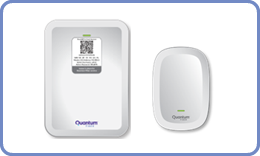
My home has a pre-installed SmartNID and Pod.
Need assistance?
We're happy to help.

Frequently asked questions
No, Quantum Fiber and your community have partnered to provide you with pre-installed Wi-Fi equipment available to use in your home.
Click on Shop Plans to see special pricing at your community.
Quantum Fiber is a monthly subscription for internet service that automatically renews each month on the same calendar day. Quantum Fiber internet is governed by the Quantum Fiber Internet Subscriber Agreement, posted at quantumfiber.com/legal.
Go to the How to Connect page for directions on how to connect.
After you have ordered service, set up your account password by following the instructions in your Welcome Email.
- If you don’t see your Welcome Email click on the chat bubble to request your Welcome Email to be resent.
Note: You can manage your account online, 24/7. Go to Sign In. Then log in with your email address and account password.